
Categories
Why is there an exclamation symbol in my Quanser Interactive Labs (QLabs) user interface?
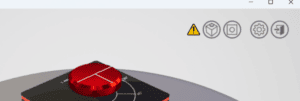 The exclamation symbol indicates that the front-end Quanser Interactive Labs graphic is not connected to the background real-time (RT) model.
With the exception of the Virtual QBot Platform, QCar, and QDrone 2, the RT model for the virtual experiment starts automatically when the virtual experiment is loaded. If the RT model does not start, try restarting the virtual experiment.
If the issue persists, it could be due to the Firewall or an antivirus software blocking the TCP/IP communication between the RT model and graphical front-end. See here for a listing of the port numbers used. Inbound/outbound exceptions can be created to allow communication on specific ports.
If using the Virtual QBot Platform, QCar, and QDrone 2, the RT model does not start automatically. The actor, e.g., QBot Platform, needs to be created/spawned using a Python or MATLAB script supplied with the resources, e.g., qlabs_setup.m or qlabs_setup.py, or your own script. See the lab procedure for the instructions on which script to run and the QLabs Actors Reference for more information on how to spawn actors.
The exclamation symbol indicates that the front-end Quanser Interactive Labs graphic is not connected to the background real-time (RT) model.
With the exception of the Virtual QBot Platform, QCar, and QDrone 2, the RT model for the virtual experiment starts automatically when the virtual experiment is loaded. If the RT model does not start, try restarting the virtual experiment.
If the issue persists, it could be due to the Firewall or an antivirus software blocking the TCP/IP communication between the RT model and graphical front-end. See here for a listing of the port numbers used. Inbound/outbound exceptions can be created to allow communication on specific ports.
If using the Virtual QBot Platform, QCar, and QDrone 2, the RT model does not start automatically. The actor, e.g., QBot Platform, needs to be created/spawned using a Python or MATLAB script supplied with the resources, e.g., qlabs_setup.m or qlabs_setup.py, or your own script. See the lab procedure for the instructions on which script to run and the QLabs Actors Reference for more information on how to spawn actors. Technical Support
For over 20 years, Quanser has put as much emphasis on fostering and building our relationships with customers as on developing the best functional solutions.